Android app. Offline by design.

Your GPX route, finally navigable in the map app you already use.

Google Maps has no import for GPX files, and one directions link fits only nine waypoints. GPXport reads your track on your phone, simplifies it, splits long routes into consecutive sections, and hands each one to Google Maps, OsmAnd, Apple Maps or Waze.

  • 4 map apps
  • 3 free conversions a month
  • 0 routes uploaded
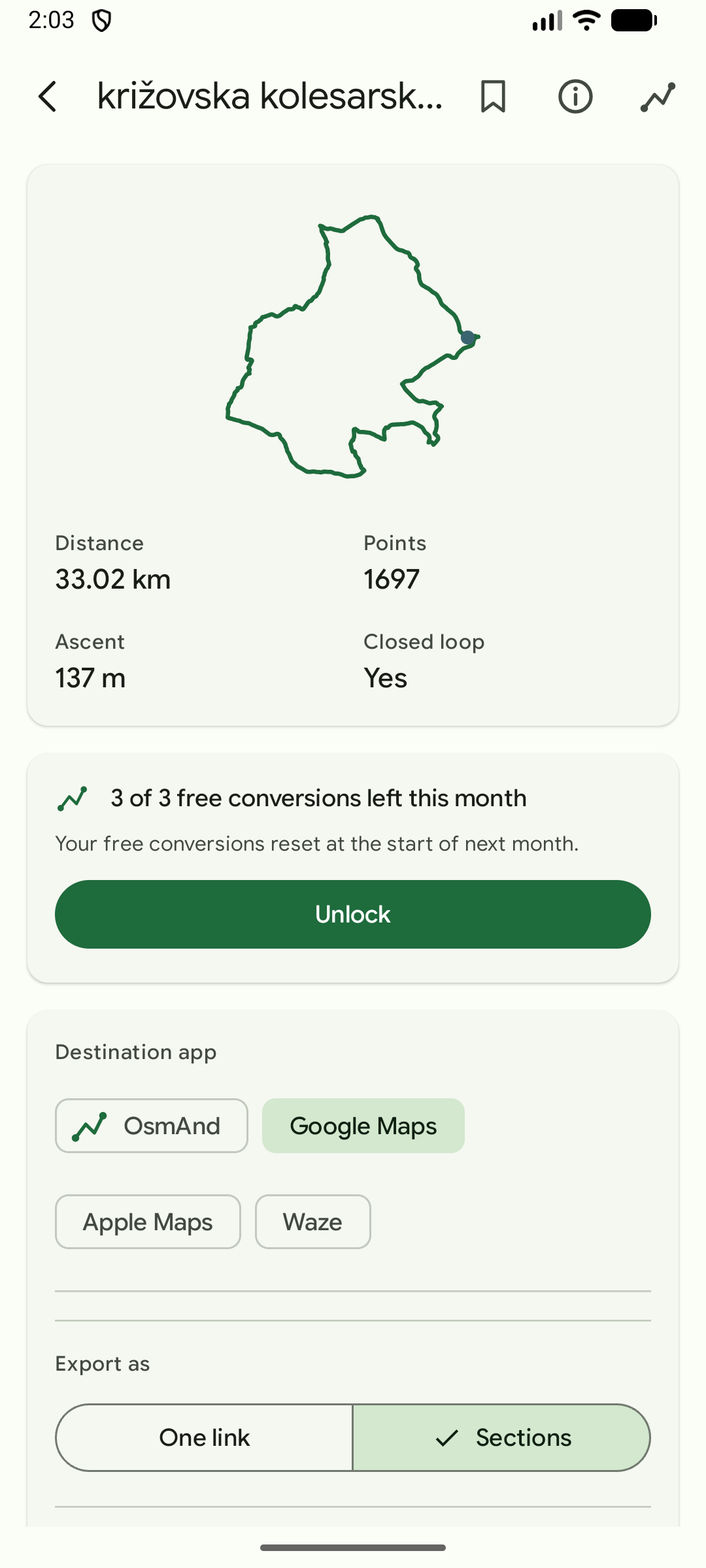
GPXport route summary screen showing distance, point count, ascent and a closed loop confirmation for an imported GPX track
Route summary before export
  • Google Maps
  • OsmAnd
  • Apple Maps
  • Waze
  • 4 map apps supported
  • 9 waypoints Google Maps accepts per link
  • 1,697 points handed to OsmAnd, unmodified
  • 100 percent of processing done on device

Why this exists

A real route does not fit in a directions link

Google Maps cannot import a GPX file. What it does accept is a directions link, and that link has hard limits: nine waypoints on the documented maximum, three in a mobile browser, and 2048 characters of URL in total.

A recorded cycling loop has thousands of points. GPXport started on one of them: a 33 km loop around Štrigova in Croatia, 1,697 points, a closed circuit ridden for the first time on a borrowed bike.

The first version exported that loop as a single link and Google Maps answered with an empty directions form. The track ended on the exact coordinate it started from, so Maps was being asked to route from a place to itself. The fix backs the destination off until it is at least 100 m from the origin, which gives up a sliver of the loop and keeps the shape of everything else. That is the kind of detail this app exists to absorb.

How GPXport treats your data

Five steps, no guesswork

How GPXport gets you moving

Every step that matters is decided before a link is opened, so nothing is discovered by tapping and hoping.

  1. Import the track

    Pick a .gpx file from storage or share one straight into GPXport from any app. Routes you saved earlier are one tap away, above the file picker, because they are usually what you actually want.

  2. Read the summary

    Distance, point count, total ascent and whether the track is a closed loop. Often that is enough to know you opened the right file, before anything is exported.

  3. Pick the destination app

    OsmAnd, Google Maps, Apple Maps or Waze. Each target is shown with its real limit in the app rather than after a tap, and the controls that do not apply to it stay hidden instead of pretending to work.

  4. Shape the export

    One link reduces a track to its nine most significant waypoints. Sections cut it into consecutive links of eleven coordinates each, and a detail slider trades fidelity against the number of links while you watch.

  5. Open and ride

    Choose bicycle, motorcycle, car or walking where the target uses a travel mode, then open the link. OsmAnd receives the GPX file itself through a FileProvider, so all 1,697 points of the test loop survive untouched.

Long routes, handled properly

One link cuts corners. Sections keep the shape.

Google Maps accepts nine waypoints per link, so a long track has to be reduced or split. GPXport offers both answers and says what each one costs before you tap.

One link

Rough outline, one tap

The track is reduced to its nine most significant waypoints, eleven coordinates with both ends included. A count driven reduction is used instead of a tolerance, because a tolerance cannot always land on nine.

  • 1 link
  • 11 coordinates
  • Cut corners

Sections

The whole route, in order

The track is cut into consecutive links of eleven coordinates. Each link starts where the previous one ended, so they join up and cover the route in order. A tolerance driven reduction is used here, because a tolerance is what the slider means.

  • 33 links at 5 m detail
  • 9 links at the default 40 m
  • Join up in order

Destination comparison

Each map app gets the honest answer

No target pretends to be another. GPXport states the real limit of each destination when you pick it, not after it fails.

  • OsmAnd

    Whole track

    Takes the GPX file itself

    Waypoint limit
    None
    Keeps the whole route
    Yes

    The only target that follows every point. OsmAnd registers the GPX type and path patterns, so the file is handed over through a FileProvider with no simplification at all.

  • Apple Maps

    Mostly whole

    Takes one directions link

    Waypoint limit
    Not documented
    Keeps the whole route
    Mostly

    Repeated waypoint parameters carry far more than Google, with URL length as the practical ceiling. It opens in Apple Maps on Apple devices and falls back to Apple web maps elsewhere, and the app says so.

  • Google Maps

    Split or reduced

    Takes one or more directions links

    Waypoint limit
    9 per link
    Keeps the whole route
    No

    One link reduces the track to nine waypoints. Sections keep far more of the real shape by cutting it into consecutive links that join up in order. Both are supported, and the trade is explained in the app.

  • Waze

    One destination

    Takes one destination

    Waypoint limit
    1, no waypoints
    Keeps the whole route
    No

    Waze has no waypoint parameter at all, so the honest export is a navigation link to a single point on the route, after which Waze routes its own way. GPXport says that plainly instead of implying more.

Free and paid

Useful for free. Unlimited for €3.99 once.

No subscription, no account, no ads. A conversion is one imported track that you export, not one tap on one link, so trying a second map app with the same route costs nothing extra.

Free, forever

€0

  • Import a GPX file or share one in
  • Route summary before export
  • All four map apps
  • One link and sections exports
  • Bicycle, motorcycle, car and walking
  • Three conversions a month
One time

Unlock

€3.99

  • Unlimited conversions
  • Save routes on your device and reopen them later
  • Copy every section link in one tap, useful on a 33 section route
  • Opening, renaming and deleting saved routes stay free
  • Handled by Google Play Billing, tied to your Google account
Coming to Google Play

Privacy

Your route never leaves your device

GPXport reads your file locally and builds every link locally. There is no account, no analytics, no crash reporting and no ad network. The app asks for no location and no storage permission, and Android backup is disabled. The single network connection comes from Google Play Billing, which handles the optional purchase and carries no route data.

Read the full privacy policy
  • No account
  • No upload
  • No tracking
  • No location permission
  • Local processing only

Questions

Answers before you ask

Can Google Maps really not import a GPX file?

No. Google Maps has no track import and no track following mode. The only way in is a directions link, which is limited to nine waypoints on the documented maximum, three in a mobile browser, inside a 2048 character URL. GPXport reduces or splits the track to fit those limits.

Where do my routes go?

Nowhere. The file is read on your phone and the links are built on your phone. Nothing is uploaded, and there is no server for routes to reach. See the privacy policy for the full detail.

What happens with a loop that ends where it started?

A one-link export backs the destination off until it is at least 100 m from the origin, because Maps cannot route from a place to itself and silently drops the waypoints. Only a sliver of the loop is given up, and the result stays a prefix of the original track.

Do I need an account or a subscription?

No account is needed for anything. The app is free to use with three conversions a month, and a single one time purchase removes the limit and adds saved routes. There is no subscription.

Which languages are supported?

The app ships in English and Slovenian, and the fonts cover Latin Extended so Slovenian Č, Š and Ž render properly rather than falling back mid-word.

What does a conversion count?

One imported track that you export. Exporting the same route to Google Maps and then to OsmAnd is one conversion, because the work is the same. Re-exporting a track already on screen is always free.

Take the next route off the file system

Install GPXport, open the track, and let your map app do the part it is good at.

Coming to Google Play

The Google Play listing is not available yet. Once it is published the app is free to use, with a one time €3.99 unlock for unlimited conversions.

GPXport feature graphic showing a GPX track becoming a route on a map